Fell & Sell Current Version, Patch Notes & Game Status
Fell & Sell current version tracker: Ver. 1.7.1 hotfix, 1.7.0 weapon hot-swapping and the new armor formula, 1.6.0 difficulty settings, the Sep 18 Dungeon Update, and which earlier advice went stale.
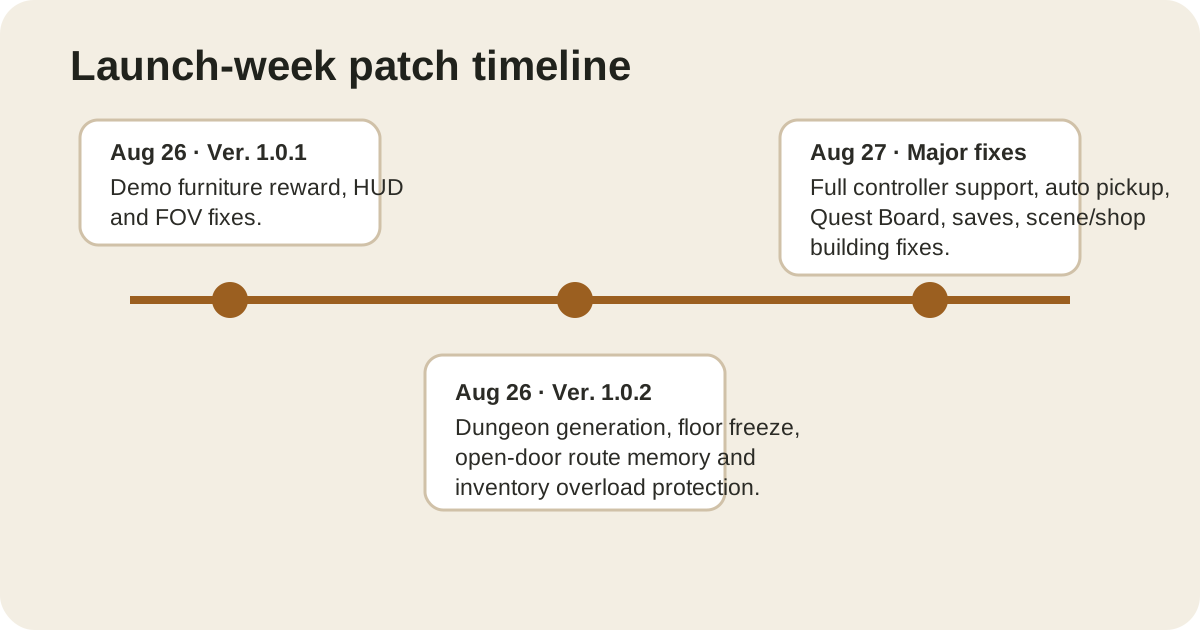
Fell & Sell changed quickly during its first 48 hours. That matters because dungeon, inventory, Quest Board and controller advice from launch day can already be stale.
Current public baseline
As checked on Aug 29, SteamDB lists build 24975315 on the public branch, updated Aug 27. SteamDB also lists a separate beta branch with a warning that it may cause lost progress or broken saves. This site treats the public branch as the player-facing baseline and does not turn beta-only changes into guide facts.
Aug 26 — Ver. 1.0.1
This hotfix focused on the demo-player furniture reward, high-stat HUD bars, FOV settings and localization.
Aug 26 — Ver. 1.0.2
This was the important dungeon patch. It fixed blocked procedural passages, freezes when loading a floor, overloaded weapon swaps, equipment stacks and several settings issues. It also made opened doors stay open — a small change that became the best available route-memory tool in a game without a normal mini-map.
Aug 27 — major fixes / Build 24975315
SteamDB records the Aug 27 update as build 24975315. It added full controller support, auto pickup and full key rebinding, while fixing Quest Board, save, scene/shop-building and locked-cell issues.
Aug 31 — Dungeon Map + Inventory Sorting
Official notes: a HUD dungeon minimap, full map on \, and one-button inventory sorting. Storage-chest safeguards also shipped. Launch-week “no mini-map” advice is stale. See the Dungeon guide.
Sep 3 — languages and optimization
Official notes: full support for Danish, Dutch, Italian, Norwegian and Swedish. Performance work across village, forest and dungeon maps. Brightness/gamma and extra quality (including SSAO) settings. This is not a gameplay systems patch.
Sep 4 — Shop Update
Official SHOP UPDATE (first roadmap beat). Launch-week “wall the door with tables so NPCs ghost through” advice is stale.
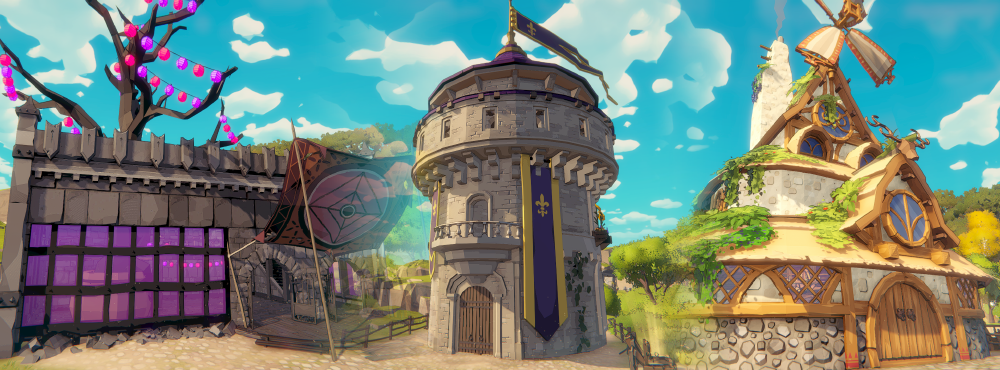
New properties:
- Darkmoon Fair — carnival floor
- Ivory Tower — marble tower
- Old Vinery — vine-covered storefront
NPC pathfinding:
- Furniture is a real obstacle. Shoppers path around displays instead of ghosting through them.
- If the path is fully blocked they stop, say they cannot get through, and will not spend.
- Full counter queues now complain the line is full instead of dumping fake “too expensive” lines.
- Automatic counter payments: gold hits the counter without a second click.
- Pricing logic rework: check your prices after loading this patch.
Sep 5 — Ver. 1.4.2 pricing help + NPC AI
Follow-up hotfix:
- Price text turns red if you exceed the acceptable price by 10% to 33%.
- First load on this patch auto-adjusts items priced way too high to a random acceptable value (not the perfect max).
- Checkout is a single interaction; customers drop gold as they reach the counter.
- NPC pathfinding around furniture smoothed.
- Controller/keyboard conflict (keyboard dying if a pad was connected) is listed as fixed.
Why version labels appear inconsistent
The Steam discussion index has also shown a pinned title referring to “Major Fixes - build 1.1.0.” The official announcement itself is titled “Gamepad Support + Major Fixes!” and SteamDB identifies the depot build as 24975315. Rather than guess which public-facing semantic version the developer intends long-term, this site identifies the current evidence by date and SteamDB build.
That is deliberate: a build number is less ambiguous than inventing a version label.
Sources
Sep 5 — Ver. 1.4.2 (pricing cues, one-click checkout)
The follow-up to the big Shop Update targeted two things: knowing what to charge, and serving customers faster.
- Pricing visual cue: when you set a price, the text now turns red if you exceed the acceptable price by 10% to 33%. That band is the “warn me before customers walk” zone — pushing past it is what makes shoppers leave.
- One-time price auto-adjustment: the first time you load a save on this patch, items currently priced far too high are automatically reset to a random acceptable value. It will never be the optimal maximum, so you still have to tune them yourself.
- Streamlined checkout: serving an NPC is now a single interaction, and customers drop their gold on the counter as soon as they reach it. Busy-hour throughput is noticeably higher.
- NPC pathfinding fix: customers no longer get stuck on your furniture layout.
- Controller/keyboard conflict fixed: if you had a gamepad plugged into your PC, the keyboard could stop responding entirely. That is fixed.
- Foliage rendering optimised for a performance gain.
The pricing visual cue and the auto-adjustment interact: after the patch your overpriced stock is normalised once, and the red text is what tells you when you are drifting back into the danger band.
Sep 7 — Ver. 1.4.3 (queueing, QuestBoard, furniture prices)
- Queueing logic reworked so shoppers flow more smoothly through peak hours.
- Smart counter navigation: NPCs no longer walk all the way upstairs to pay when an active counter is free on the ground floor. If your layout has multiple counters, this changes which ones actually get used.
- Pricing interface clarified further.
- QuestBoard loading fix: the board could fail or hang indefinitely while loading. This is the one to know about if you were blaming the board for doing nothing.
- Audio stuttering fixed.
- Furniture price stacking fixed: picking up and re-placing furniture repeatedly multiplied the prices displayed on it.
- Handheld cursor fix for responsiveness on portable devices.
- Legacy save compatibility: save-loading bugs fixed for players carrying progress over from the older 1.4.0 demo version.
- Localisation fixes across several languages.
What this means for advice written before Sep 5
- Any guide telling you to price at the top of the accept range now has a red-text warning system attached — use it.
- Checkout advice from launch week (multiple interactions per customer) is obsolete since 1.4.2.
- If your shop felt slow specifically because customers ignored a ground-floor counter and went upstairs, that behaviour is gone as of 1.4.3.
Sep 18 — Dungeon Update (live)
The official Dungeon Update is on the public branch. This is the second roadmap beat after the Shop Update, not a hotfix.
- Dungeon+: after you defeat the marked dungeon boss, look for a shrine that unlocks harder Dungeon+ runs with unique high-tier rewards.
- Elites: rooms can spawn Elite enemies with more health, more damage, and extra modifiers. They can drop Unholy Skulls used to upgrade gear.
- Blasphemous Anvil: weapons and armor can be upgraded to a maximum of +3 by combining basic resources with Unholy Skulls.
- New unlocks from Dungeon+: Demonic Tabernacle, Demonic Rostrum, and Skull Goblet.
- Combat: enemies spawn in room groups instead of one-by-one, and AI is more aggressive (wait, react, new movesets). Treat launch-week “pick them off as they trickle in” clips as stale.
See the Dungeon guide for how this changes when to leave a floor.
Sep 21 — Ver. 1.6.0 (difficulty settings, magic balance, Elite regen nerf)
The apology patch. The Dungeon Update made the game too punishing for a large part of the community, so 1.6.0 added selectable difficulty levels. You must return to the Village for a difficulty change to apply.
- EASY — you do not lose equipped items on death (inventory loot is still lost), enemies move and attack slightly slower, no lunge attacks, no attack combos, and furniture combat bonuses are at 100%.
- MEDIUM — the intended experience, described as the pre-1.5.0 state of the game with the new enemy animations, improved AI and room placements kept.
- HARD — the post-1.5.0 brutal state, but with larger magic area of effect to help you survive; furniture combat bonuses drop to 50%.
Also in this patch: magic area of effect increased for crowd control, Elite health regeneration nerfed from 10% to 5% per second, slightly increased common material drop chances, the right-mouse-button quick price change restored when placing goods on counters, and the Armor stat renamed to Damage Reduction to make its effect clearer.
Sep 22 — Ver. 1.6.1 (staff projectile fix)
A single-issue hotfix: staff projectiles no longer collide with doorframes or get blocked when shooting through doorways.
Sep 23 — Ver. 1.7.0 (weapon hot-swapping, minimap enemies, armor formula)
The quality-of-life pass, and it changes combat maths as well as convenience:
- Weapon hot-swapping — swap weapons on the fly, so a shield in the left hand no longer locks you out of ranged or close-quarters swaps.
- Enemies on the minimap — foes behind walls, obstacles and corners are now visible on the minimap.
- Armor diminishing returns — the new damage multiplier is
Damage Multiplier = 60 / (Armor Value + 60). Stacking armor still helps, but each point is worth less than the last. - Armor breakdown in the UI — armor value is displayed right below your equipment, showing exactly how much real damage you are blocking.
- Completed tab on the Questboard — review finished quests.
- Main-menu exit confirmation added.
- Combat and economy fixes: forest goblins no longer trip over logs thrown in their path, Vampiric Aura now registers hits and heals properly, a quick-slot item duplication exploit is closed, the Questboard displays quests correctly when interacted with, the save-delete trash icon works, dungeon teleportation is faster and can be performed while attacking (taking damage cancels it), weapon and armor drop rates in the Overgrown and Darkest Dungeon biomes were slightly reduced, and Leather now drops from more destructible objects.
Sep 23 — Ver. 1.7.1 (Grandma’s letter, credits)
Quick follow-up hotfix: the credits are now in the main menu, and the Level 16 boss in Dungeon+ no longer drops Grandma’s letter — the item belongs to its intended progression, not the endgame boss drop table.